
A Second Short Program
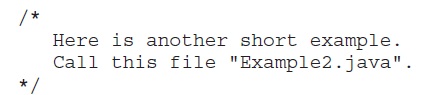
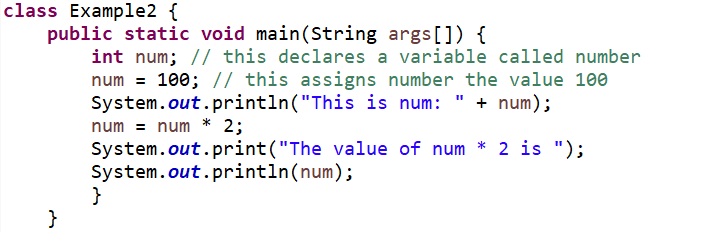
Perhaps no other concept is more fundamental to a programming language than that of a variable. As you probably know, a variable is a named memory location that may be assigned a value by your program. The value of a variable may be changed during the execution of the program. The next program shows how a variable is declared and how it is assigned a value. The program also illustrates some new aspects of console output. As the comments at the top of the program state, you should call this file Example2.java.
When you run this program, you will see the following output:

Let’s take a close look at why this output is generated. The first new line in the program is shown here:

This line declares an integer variable called num. Java (like most other languages) requires that variables be declared before they are used.
Following is the general form of a variable declaration:
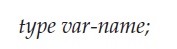
Here, type specifies the type of variable being declared, and var-name is the name of the variable. If you want to declare more than one variable of the specified type, you may use a commaseparated list of variable names. Java defines several data types, including integer, character, and floating-point. The keyword int specifies an integer type.
In the program, the line

assigns to num the value 100. In Java, the assignment operator is a single equal sign.
The next line of code outputs the value of num preceded by the string “This is num:”.

In this statement, the plus sign causes the value of num to be appended to the string that precedes it, and then the resulting string is output. (Actually, num is first converted from an integer into its string equivalent and then concatenated with the string that precedes it.
This approach can be generalized. Using the + operator, you can join together as many items as you want within a single println( ) statement.
The next line of code assigns num the value of num times 2. Like most other languages, Java uses the * operator to indicate multiplication. After this line executes, num will contain the value 200.
Here are the next two lines in the program:

Several new things are occurring here. First, the built-in method print( ) is used to display the string “The value of num * 2 is ”. This string is not followed by a newline. This means that when the next output is generated, it will start on the same line. The print( ) method is just like println( ), except that it does not output a newline character after each call. Now look at the call to println( ). Notice that num is used by itself. Both print( ) and println( ) can be used to output values of any of Java’s built-in types.